<?xml version="1.0" encoding="utf-8"?>
<feed xmlns="http://www.w3.org/2005/Atom">
    <id>https://lzw-723.github.io</id>
    <title>lzw-723&apos;s blog</title>
    <updated>2022-11-23T12:48:20.223Z</updated>
    <generator>https://github.com/jpmonette/feed</generator>
    <link rel="alternate" href="https://lzw-723.github.io"/>
    <link rel="self" href="https://lzw-723.github.io/atom.xml"/>
    <subtitle>积恶成*</subtitle>
    <logo>https://lzw-723.github.io/images/avatar.png</logo>
    <icon>https://lzw-723.github.io/favicon.ico</icon>
    <rights>All rights reserved 2022, lzw-723&apos;s blog</rights>
    <entry>
        <title type="html"><![CDATA[raylib基础学习]]></title>
        <id>https://lzw-723.github.io/post/raylib-ji-chu-xue-xi/</id>
        <link href="https://lzw-723.github.io/post/raylib-ji-chu-xue-xi/">
        </link>
        <updated>2022-03-06T02:24:49.000Z</updated>
        <summary type="html"><![CDATA[<p><strong>raylib</strong> 是一个跨平台、易用的图形库，围绕OpenGL 1.1、2.1、3.3和OpenGL ES 2.0构建。</p>
]]></summary>
        <content type="html"><![CDATA[<p><strong>raylib</strong> 是一个跨平台、易用的图形库，围绕OpenGL 1.1、2.1、3.3和OpenGL ES 2.0构建。</p>
<!-- more -->
<p>尽管它是用C语言编写的，却有超过50种不同语言的绑定。本教程将使用C语言。<br>
更确切地说，是C99。</p>
<pre><code class="language-c">#include &lt;raylib.h&gt;

int main(void)
{
    const int screenWidth = 800;
    const int screenHeight = 450;

    // 在初始化raylib之前，可以设置配置标志
    SetConfigFlags(FLAG_MSAA_4X_HINT | FLAG_VSYNC_HINT);

    // raylib并不要求我们存储任何实例结构
    // 目前raylib一次只能处理一个窗口
    InitWindow(screenWidth, screenHeight, &quot;MyWindow&quot;);

    // 设置我们的游戏以每秒60帧的速度运行
    SetTargetFPS(60);

    // 设置一个关闭窗口的键。
    //可以是0，表示没有键
    SetExitKey(KEY_DELETE);

    // raylib定义了两种类型的相机。Camera3D和Camera2D
    // Camera是Camera3D的一个类型化定义
    Camera camera = {
            .position = {0.0f, 0.0f, 0.0f},
            .target   = {0.0f, 0.0f, 1.0f},
            .up       = {0.0f, 1.0f, 0.0f},
            .fovy     = 70.0f,
            .type     = CAMERA_PERSPECTIVE
    };


    // raylib支持加载各种不同的文件格式的模型、动画、图像和声音。
    Model myModel = LoadModel(&quot;my_model.obj&quot;);
    Font someFont = LoadFont(&quot;some_font.ttf&quot;);

    // 创建一个100x100的渲染纹理
    RenderTexture renderTexture = LoadRenderTexture(100, 100);

    // WindowShouldClose方法检查用户是否正在关闭窗口。
    // 可能用的是快捷方式、窗口控制或之前设置的关闭窗口键
    while (!WindowShouldClose())
    {

        // BeginDrawing方法要在任何绘图操作之前被调用。
        BeginDrawing();
        {

            // 为背景设定某种颜色
            ClearBackground(BLACK);

            if (IsKeyDown(KEY_SPACE))
                DrawCircle(400, 400, 30, GREEN);

            // 简单地绘制文本
            DrawText(&quot;Congrats! You created your first window!&quot;,
                     190, // x
                     200, // y
                     20,  // 字体大小
                     LIGHTGRAY
            );

            // 大多数函数都有几个版本
            // 通常后缀为Ex, Pro, V
            // 或者是Rec、Wires（仅适用于3D）、Lines（仅适用于2D）。
            DrawTextEx(someFont,
                       &quot;Text in another font&quot;,
                       (Vector2) {10, 10},
                       20, // 字体大小
                       2,  // 间距
                       LIGHTGRAY);

            // 绘制3D时需要，有2D的等价方法
            BeginMode3D(camera);
            {

                DrawCube((Vector3) {0.0f, 0.0f, 3.0f},
                         1.0f, 1.0f, 1.0f, RED);

                // 绘图时的白色色调将保持原来的颜色
                DrawModel(myModel, (Vector3) {0.0f, 0.0f, 3.0f},
                          1.0f, // 缩放
                          WHITE);

            }
            // 结束3D模式，这样就可以再次普通绘图
            EndMode3D();

            // 开始在渲染纹理上绘图
            BeginTextureMode(renderTexture);
            {

                // 它的行为与刚才调用的`BeginDrawing()`方法相同

                ClearBackground(RAYWHITE);

                BeginMode3D(camera);
                {

                    DrawGrid(10, // Slices
                             1.0f // 间距
                    );

                }
                EndMode3D();

            }
            EndTextureMode();

            // 渲染有Texture2D字段的纹理
            DrawTexture(renderTexture.texture, 40, 378, BLUE);

        }
        EndDrawing();
    }

    // 卸载已载入的对象
    UnloadFont(someFont);
    UnloadModel(myModel);

    // 关闭窗口和OpenGL上下文
    CloseWindow();

    return 0;
}

</code></pre>
<h2 id="延伸阅读">延伸阅读</h2>
<p>raylib有一些<a href="https://www.raylib.com/examples.html">不错的例子</a><br>
如果你不喜欢C语言你也可以看看<a href="https://github.com/raysan5/raylib/blob/master/BINDINGS.md">raylib的其他语言绑定</a></p>
<p>我的博客即将同步至腾讯云开发者社区，邀请大家一同入驻：https://cloud.tencent.com/developer/support-plan?invite_code=mlz8qfx2vlil</p>
]]></content>
    </entry>
    <entry>
        <title type="html"><![CDATA[Lojban教程 - 逻辑语学习中常见专有名词列表]]></title>
        <id>https://lzw-723.github.io/post/lojban-jiao-cheng-luo-ji-yu-xue-xi-zhong-chang-jian-zhuan-you-ming-ci-lie-biao/</id>
        <link href="https://lzw-723.github.io/post/lojban-jiao-cheng-luo-ji-yu-xue-xi-zhong-chang-jian-zhuan-you-ming-ci-lie-biao/">
        </link>
        <updated>2022-01-29T03:28:28.000Z</updated>
        <summary type="html"><![CDATA[<p>转载修改自<a href="https://tieba.baidu.com/p/2875387082">【发布】【逻辑语常用术语的汉语专有名词列表V1.1】</a></p>
]]></summary>
        <content type="html"><![CDATA[<p>转载修改自<a href="https://tieba.baidu.com/p/2875387082">【发布】【逻辑语常用术语的汉语专有名词列表V1.1】</a></p>
<!-- more -->
<table>
<thead>
<tr>
<th>常见逻辑语术语</th>
<th>术语语言类型</th>
<th>汉语专有名词</th>
</tr>
</thead>
<tbody>
<tr>
<td>valsi</td>
<td>逻辑语</td>
<td>词</td>
</tr>
<tr>
<td>brivla</td>
<td>逻辑语</td>
<td>谓词</td>
</tr>
<tr>
<td>gismu</td>
<td>逻辑语</td>
<td>根词</td>
</tr>
<tr>
<td>lujvo</td>
<td>逻辑语</td>
<td>合成词</td>
</tr>
<tr>
<td>fu'ivla</td>
<td>逻辑语</td>
<td>借词</td>
</tr>
<tr>
<td>cmene</td>
<td>逻辑语</td>
<td>名字词</td>
</tr>
<tr>
<td>selma'o</td>
<td>逻辑语</td>
<td>结构词类</td>
</tr>
<tr>
<td>cmavo</td>
<td>逻辑语</td>
<td>结构词</td>
</tr>
<tr>
<td>indicators</td>
<td>英语</td>
<td>态度指示词</td>
</tr>
<tr>
<td>discursives</td>
<td>英语</td>
<td>转折词</td>
</tr>
<tr>
<td>connectives</td>
<td>英语</td>
<td>连词</td>
</tr>
<tr>
<td>modals</td>
<td>英语</td>
<td>介词</td>
</tr>
<tr>
<td>terminator</td>
<td>英语</td>
<td>终止词</td>
</tr>
<tr>
<td>rafsi</td>
<td>逻辑语</td>
<td>词缀</td>
</tr>
<tr>
<td>tanru</td>
<td>逻辑语</td>
<td>词组</td>
</tr>
<tr>
<td>jufra</td>
<td>逻辑语</td>
<td>句</td>
</tr>
<tr>
<td>bridi</td>
<td>逻辑语</td>
<td>谓句</td>
</tr>
<tr>
<td>selbri</td>
<td>逻辑语</td>
<td>谓语</td>
</tr>
<tr>
<td>place structure</td>
<td>英语</td>
<td>位结构</td>
</tr>
<tr>
<td>sumti</td>
<td>逻辑语</td>
<td>项</td>
</tr>
<tr>
<td>sumti</td>
<td>逻辑语</td>
<td>项标签</td>
</tr>
<tr>
<td>abstraction</td>
<td>英语</td>
<td>谓词子句</td>
</tr>
<tr>
<td>relative clause</td>
<td>英语</td>
<td>定语从句</td>
</tr>
</tbody>
</table>
]]></content>
    </entry>
    <entry>
        <title type="html"><![CDATA[Lojban基础教程 - 字母]]></title>
        <id>https://lzw-723.github.io/post/lojban-ji-chu-jiao-cheng-zi-mu/</id>
        <link href="https://lzw-723.github.io/post/lojban-ji-chu-jiao-cheng-zi-mu/">
        </link>
        <updated>2022-01-28T11:55:12.000Z</updated>
        <content type="html"><![CDATA[<h2 id="字母">字母</h2>
<p>逻辑语使用除了<code>h</code>、<code>q</code>、<code>w</code>外的23个拉丁字母，另外，在字母表内有三个特殊符号<code>'</code>、<code>,</code>、<code>.</code>，其地位与其他拉丁字母是等同的。除了字母表内的符号外，<strong>逻辑语在行文中不使用标点符号和其他符号</strong>。</p>
<p>逻辑语字母表：<br>
辅音（常用<em>C</em>表示）：<strong><code>b</code>  <code>c</code>  <code>d</code>  <code>f</code>  <code>g</code> <code>j</code>  <code>k</code>  <code>l</code>  <code>m</code>  <code>n</code>  <code>p</code>  <code>r</code>  <code>s</code>  <code>t</code>  <code>v</code>  <code>x</code>  <code>z</code></strong><br>
元音（常用<em>V</em>表示）：<strong><code>a</code>  <code>e</code>  <code>i</code>  <code>o</code>  <code>u</code>  <code>y</code></strong><br>
特殊符号（既不是辅音也不是元音）：<strong><code>,</code> <code>.</code>  <code>'</code></strong></p>
<blockquote>
<p><em>一音一符原则：在任何情况下，每个字母的读音是不变的，读音与字母存在一对一关系。</em></p>
</blockquote>
<p>逻辑语还有一些二合字母（两个字母共同组成一个音），其中有双辅音和双元音。</p>
<h2 id="元音">元音</h2>
<blockquote>
<p>逻辑语内任何元音开头的词前都要加<code>.</code>，无例外，且这个点在词典内是不会写出来的</p>
</blockquote>
<h3 id="元音字母">元音字母</h3>
<p>元音字母是指语言里起着发声作用的字母。<br>
逻辑语一共有六个元音字母。</p>
<table>
<thead>
<tr>
<th>元音字母</th>
<th>发音</th>
</tr>
</thead>
<tbody>
<tr>
<td>a</td>
<td>啊（汉语拼音 a）</td>
</tr>
<tr>
<td>e</td>
<td>这个读音汉语拼音里没有,类似于英语单词 get 里 e 的发音。</td>
</tr>
<tr>
<td>i</td>
<td>咦（汉语拼音 i）</td>
</tr>
<tr>
<td>o</td>
<td>喔（汉语拼音 o）</td>
</tr>
<tr>
<td>u</td>
<td>呜（汉语拼音 u）</td>
</tr>
<tr>
<td>y</td>
<td>呃（汉语拼音 e,这是一个需要弱读的元音，总之放松口腔，轻轻吐气发音足矣）</td>
</tr>
</tbody>
</table>
<h3 id="复合元音">复合元音</h3>
<p>两个元音可以组合在一起发出一个音，这就成了复合元音。</p>
<table>
<thead>
<tr>
<th>复合元音</th>
<th>发音</th>
</tr>
</thead>
<tbody>
<tr>
<td>ai</td>
<td>爱（汉语拼音 ai）</td>
</tr>
<tr>
<td>au</td>
<td>奥（汉语拼音 ao）</td>
</tr>
<tr>
<td>ei</td>
<td>诶（汉语拼音 ei）</td>
</tr>
<tr>
<td>oi</td>
<td>类似英语单词 boy 里 oy 的发音。</td>
</tr>
<tr>
<td>ia</td>
<td>呀（汉语拼音 ya）</td>
</tr>
<tr>
<td>ie</td>
<td>夜（汉语拼音 ye）</td>
</tr>
<tr>
<td>iu</td>
<td>优（汉语 you）</td>
</tr>
<tr>
<td>ua</td>
<td>哇（汉语拼音 wa）</td>
</tr>
<tr>
<td>ue</td>
<td>威（汉语拼音 wei）</td>
</tr>
<tr>
<td>uo</td>
<td>喔（汉语拼音 wo）</td>
</tr>
<tr>
<td>ui</td>
<td>类似英语单词 we 的发音</td>
</tr>
</tbody>
</table>
<h4 id="双元音">双元音</h4>
<table>
<thead>
<tr>
<th>双元音</th>
<th>发音</th>
</tr>
</thead>
<tbody>
<tr>
<td>ii</td>
<td>衣（汉语拼音 yi）</td>
</tr>
<tr>
<td>uu</td>
<td>乌（汉语拼音 wu）</td>
</tr>
</tbody>
</table>
<h2 id="辅音">辅音</h2>
<p>大多数逻辑语的辅音和英语类似，<br>
不过也有几个例外:</p>
<table>
<thead>
<tr>
<th>辅音字母</th>
<th>发音</th>
</tr>
</thead>
<tbody>
<tr>
<td>g</td>
<td>哥的声母（汉语拼音 g）</td>
</tr>
<tr>
<td>c</td>
<td>西的声母（汉语拼音 x）</td>
</tr>
<tr>
<td>j</td>
<td>师的声母（汉语拼音 sh）</td>
</tr>
<tr>
<td>x</td>
<td>喝的声母（汉语拼音 h）</td>
</tr>
</tbody>
</table>
<h3 id="双辅音">双辅音</h3>
<table>
<thead>
<tr>
<th>辅音字母</th>
<th>发音</th>
</tr>
</thead>
<tbody>
<tr>
<td>tc</td>
<td><strong>ch</strong>ip</td>
</tr>
<tr>
<td>dj</td>
<td><strong>j</strong>ump、在汉语和英语中常见的发音 j</td>
</tr>
</tbody>
</table>
]]></content>
    </entry>
    <entry>
        <title type="html"><![CDATA[扩充巴科斯范式(ABNF)初识]]></title>
        <id>https://lzw-723.github.io/post/kuo-chong-ba-ke-si-fan-shi-abnfchu-shi/</id>
        <link href="https://lzw-723.github.io/post/kuo-chong-ba-ke-si-fan-shi-abnfchu-shi/">
        </link>
        <updated>2021-12-07T08:29:32.000Z</updated>
        <summary type="html"><![CDATA[<p><strong>巴科斯范式</strong>是以美国人巴科斯(Backus)和丹麦人诺尔(Naur)的名字命名的一种形式化的语法表示方法，用来描述语法的一种形式体系，是一种典型的<strong>元语言</strong>。</p>
]]></summary>
        <content type="html"><![CDATA[<p><strong>巴科斯范式</strong>是以美国人巴科斯(Backus)和丹麦人诺尔(Naur)的名字命名的一种形式化的语法表示方法，用来描述语法的一种形式体系，是一种典型的<strong>元语言</strong>。</p>
<!-- more -->
<h2 id="起步">起步</h2>
<p>一个ABNF规范是一些推导规则的集合：</p>
<pre><code class="language-abnf">规则 = 定义;注释CR LF
</code></pre>
<p>可细分为以下几个部分：</p>
<ul>
<li><code>规则</code></li>
<li><code>定义</code></li>
<li><code>注释</code> (可选)</li>
<li><code>CR LF</code>(回车、换行)结束</li>
</ul>
<h3 id="规则名">规则名</h3>
<p>大小写不敏感</p>
<blockquote>
<p>规则名字不区分大小写:<br>
<code>&lt;rulename&gt;</code>, <code>&lt;Rulename&gt;</code>, <code>&lt;RULENAME&gt;</code>和<code>&lt;rUlENamE&gt;</code>指的都是同一个规则。<br>
规则名由一个字母或多个<em>字母</em>、<em>数字</em>和<em>连字符</em>(<em>减号</em>)组成。</p>
</blockquote>
<p>尖括号非必须</p>
<blockquote>
<p>用尖括号(<code>&lt;</code>、<code>&gt;</code>)包围规则名不是必需的(与<code>BNF</code>一样)，它们可以用来在文中方便识别出规则名。</p>
</blockquote>
<h3 id="最终值">最终值</h3>
<p>最终值为一个或多个数值字符。</p>
<p>数值字符可按下面的方式指定：先是一个百分号<code>%</code>，紧跟着基数(<code>b</code>=<em>二进制</em>, <code>d</code> = <em>十进制</em>, <code>x</code> = <em>十六进制</em>)，再其后是这个数值或数值串(用<code>.</code>来指示串联)。例如：<code>回车</code>可以用十进制的<code>%d13</code>或十六进制的<code>%x0D</code>来指定，而<code>回车换行</code>则可以用<code>%d13.10</code>来指定。</p>
<p>字面文本通过包含在在双引号<code>&quot;</code>中字符串指定。这些字符串不区分大小写，使用 <strong>(US-)ASCII</strong>字符集。所以字符串<code>abc</code>将匹配<code>abc</code>、<code>Abc</code>、<code>aBc</code>、<code>abC</code>、<code>ABc</code>、<code>AbC</code>、<code>aBC</code>和<code>ABC</code>。<br>
区分大小写的匹配必须定义明确的字符，例如:若要匹配<code>aBc</code>，定义必须是<code>%d97</code> <code>%d66</code> <code>%d99</code>。</p>
<h3 id="操作符">操作符</h3>
<h4 id="空白字符">空白字符</h4>
<p>空白字符被用来分隔定义中的各个元素:要使空格被识别为分割符则必须明确的包含它。</p>
<h4 id="串联">串联</h4>
<pre><code class="language-abnf">规则1规则2
</code></pre>
<p>规则可以通过列出一系列的规则名来定义。</p>
<p>要匹配字符串<code>aba</code>可以使用下列规则:</p>
<pre><code class="language-abnf">foo = %x61 ; a
bar = %x62 ; b
mumble = foo bar foo
</code></pre>
<h4 id="选择">选择 /</h4>
<pre><code class="language-abnf">规则1 / 规则2
</code></pre>
<p>一个规则可以通过用斜杠(<code>/</code>)分隔的可供选择的子规则列表来定义。</p>
<p>要接受规则<foo>或规则<bar>可构造如下规则:</p>
<pre><code class="language-abnf">foobar = foo / bar
</code></pre>
<h4 id="增量选择">增量选择 =/</h4>
<pre><code class="language-abnf">规则1 =/ 规则2
</code></pre>
<p>可以通过在规则名和定义之间使用<code>=/</code>来向一个规则增加补充选择。</p>
<p>规则</p>
<pre><code class="language-abnf">ruleset = alt1 / alt2 / alt3 / alt4 / alt5
</code></pre>
<p>等价于</p>
<pre><code class="language-abnf">ruleset = alt1 / alt2
ruleset =/ alt3
ruleset =/ alt4 / alt5
</code></pre>
<h4 id="值范围c-">值范围%c##-##</h4>
<pre><code class="language-abnf">%c##-##
</code></pre>
<p>数值范围可以通过使用连字符(<code>-</code>)来指定。</p>
<p>规则</p>
<pre><code class="language-abnf">OCTAL = &quot;0&quot; / &quot;1&quot; / &quot;2&quot; / &quot;3&quot; / &quot;4&quot; / &quot;5&quot; / &quot;6&quot; / &quot;7&quot;
</code></pre>
<p>等价于</p>
<pre><code class="language-abnf">OCTAL = %x30-37
</code></pre>
<h4 id="序列组合">序列组合 ()</h4>
<pre><code class="language-abnf">(规则1规则2)
</code></pre>
<p>在定义中，元素可以放置在圆括号中来将规则组合起来，该组合视为单个元素。</p>
<p>要匹配<code>elem foobar snafoo</code>或<code>elem tarfoo snafoo</code>可以构造下列规则:</p>
<pre><code class="language-abnf">group = elem (foobar / tarfoo) snafoo
</code></pre>
<p>要匹配<code>elem foobar</code>或<code>tarfoo snafoo</code>可以构造下列规则:</p>
<pre><code class="language-abnf">group = elem foobar / tarfoo snafoo
group = (elem foobar) / (tarfoo snafoo)
</code></pre>
<h4 id="不定量重复mn">不定量重复m*n</h4>
<p>元素前面的星号<code>*</code>表示重复，其完整形式如下：</p>
<pre><code class="language-abnf">m*n规则
</code></pre>
<p>要表示一个元素的重复，就要使用<code>&lt;m&gt;*&lt;n&gt;</code>元素形式。可选的<code>&lt;m&gt;</code>给出要包含的元素的最小数目，默认为0；可选的<n>给出要包含的元素的最大数目，默认为无穷大。</p>
<p>例子：</p>
<pre><code class="language-abnf">*元素 ; 表示零个或更多元素
1*元素 ; 表示一个或更多元素
2*4元素 ; 表示两个至四个元素
</code></pre>
<h4 id="定量重复n">定量重复n</h4>
<pre><code class="language-abnf">n规则
</code></pre>
<p>要表示特定数目的元素可使用形式<code>&lt;n&gt;</code>元素，相当于用不定量重复形式表示的<code>&lt;n&gt;*&lt;n&gt;</code>元素。</p>
<p>使用<code>2DIGIT</code>得到两个数字，使用<code>3DIGIT</code>得到三个数字。(<code>DIGIT</code>在下面的核心规则中定义，也见例子中的zip-code)。</p>
<h4 id="可选序列">可选序列[]</h4>
<pre><code class="language-abnf">[规则]
</code></pre>
<p>要表示可选元素，下列构造等价:</p>
<pre><code class="language-abnf">[foobar snafoo]
*1(foobar snafoo)
0*1(foobar snafoo)
</code></pre>
<h4 id="注释">注释;</h4>
<pre><code class="language-abnf">;注释
</code></pre>
<p>注释从一个分号(<code>;</code>)开始，并持续到此行的结束。</p>
<h4 id="操作符优先级">操作符优先级</h4>
<p>下面的操作符给出了从高(结合最紧密)到低(结合最松散)的优先级:</p>
<ol>
<li>规则名、最终值</li>
<li>注释;</li>
<li>值范围%c##-##</li>
<li>重复*</li>
<li>组合 ()、可选[]</li>
<li>串联</li>
<li>选择 /</li>
</ol>
<blockquote>
<p>选择操作符与串联一起使用会造成混淆，因此建议使用组合来确保串联组的明确。</p>
</blockquote>
<p>例如：</p>
<pre><code class="language-abnf">我们 = 你 我/他 她
</code></pre>
<p>会产生下面两种歧义：</p>
<pre><code class="language-abnf">(你 我)/(他 她)
(你) (我/他) (她)
</code></pre>
<p>所以，使用组合来确保不会产生歧义：</p>
<pre><code class="language-abnf">(你 我)/(他 她)
</code></pre>
<h3 id="核心规则">核心规则</h3>
<p>核心规则定义于 ABNF 标准中。</p>
<table>
<thead>
<tr>
<th>规则</th>
<th>形式定义</th>
<th>意义</th>
</tr>
</thead>
<tbody>
<tr>
<td>ALPHA</td>
<td>%x41-5A / %x61-7A</td>
<td>大写和小写 ASCII 字母(A-Z, a-z)</td>
</tr>
<tr>
<td>DIGIT</td>
<td>%x30-39</td>
<td>数字(0-9)</td>
</tr>
<tr>
<td>HEXDIG</td>
<td>DIGIT / &quot;A&quot; / &quot;B&quot; / &quot;C&quot; / &quot;D&quot; / &quot;E&quot; / &quot;F&quot;</td>
<td>十六进制数字(0-9, A-F, a-f)</td>
</tr>
<tr>
<td>DQUOTE</td>
<td>%x22</td>
<td>双引号</td>
</tr>
<tr>
<td>SP</td>
<td>%x20</td>
<td>空格</td>
</tr>
<tr>
<td>HTAB</td>
<td>%x09</td>
<td>横向制表符</td>
</tr>
<tr>
<td>WSP</td>
<td>SP / HTAB</td>
<td>空格或横向制表符</td>
</tr>
<tr>
<td>LWSP</td>
<td>*(WSP / CRLF WSP)</td>
<td>直线空白(晚于换行)</td>
</tr>
<tr>
<td>VCHAR</td>
<td>%x21-7E</td>
<td>可见(打印)字符</td>
</tr>
<tr>
<td>CHAR</td>
<td>%x01-7F</td>
<td>任何 7 - 位 US-ASCII 字符，不包括 NUL(%x00)</td>
</tr>
<tr>
<td>OCTET</td>
<td>%x00-FF</td>
<td>8 位数据</td>
</tr>
<tr>
<td>CTL</td>
<td>%x00-1F / %x7F</td>
<td>控制字符</td>
</tr>
<tr>
<td>CR</td>
<td>%x0D</td>
<td>回车</td>
</tr>
<tr>
<td>LF</td>
<td>%x0A</td>
<td>换行</td>
</tr>
<tr>
<td>CRLF</td>
<td>CR LF</td>
<td>互联网标准换行</td>
</tr>
<tr>
<td>BIT</td>
<td>&quot;0&quot; / &quot;1&quot;</td>
<td>二进制数字</td>
</tr>
</tbody>
</table>
<hr>
<h2 id="实践">实践</h2>
<h3 id="电子邮箱地址">电子邮箱地址</h3>
<pre><code class="language-abnf">email = 1*( atext / &quot;.&quot; ) &quot;@&quot; label *( &quot;.&quot; label ) label = let-dig [ [ ldh-str ] let-dig ]
</code></pre>
<h3 id="json">JSON</h3>
<pre><code class="language-abnf">// 语法树的跟【Root是系统内置，必须定义Root作为语法根节点，没有定义会报错】
Root = Value?;
// 字符串
Text : &quot;\&quot;&quot;@ = &quot;\&quot;([^\&quot;\\]|\\.)*\&quot;&quot;;
// 整型数值
Number : &quot;[0-9]&quot; = &quot;0x[0-9a-fA-F]+&quot; | &quot;[0-9]+(%.[0-9]+)?&quot;;
// 空
Null [53,155,185] = &lt;null&gt;;
// bool
Bool = &lt;true&gt; | &lt;false&gt;;
// Json值
Value = Text | Bool | Number | Null | Array | Object;
// 数组
Array = '['@ (Value ArrayValuePair*)? ']';
// Array元素
ArrayValuePair = ','@ Value;
// 映射表
Object = '{'@ (ObjectValue ObjectValuePair*)? '}';
// 键
ObjectKey = Text;
// 键值对
ObjectValue = ObjectKey ':'@ Value;
// Object元素
ObjectValuePair = ','@ ObjectValue;
</code></pre>
<h2 id="参考资料">参考资料</h2>
<ol>
<li><a href="https://zh.wikipedia.org/wiki/%E6%89%A9%E5%85%85%E5%B7%B4%E7%A7%91%E6%96%AF%E8%8C%83%E5%BC%8F">扩充巴科斯范式 - 维基百科，自由的百科全书</a></li>
<li><a href="https://zhuanlan.zhihu.com/p/22460835">从零开始的 JSON 库教程(一)：启程</a></li>
<li><a href="https://www.ietf.org/rfc/rfc5234.txt">RFC 5234: Augmented BNF for Syntax Specifications: ABNF</a></li>
<li><a href="https://zhuanlan.zhihu.com/p/364844806">从零开始设计一门属于自己的开发语言</a></li>
</ol>
]]></content>
    </entry>
    <entry>
        <title type="html"><![CDATA[【译】5分钟入门Nim编程语言]]></title>
        <id>https://lzw-723.github.io/post/yi-5-fen-zhong-ru-men-nim-bian-cheng-yu-yan/</id>
        <link href="https://lzw-723.github.io/post/yi-5-fen-zhong-ru-men-nim-bian-cheng-yu-yan/">
        </link>
        <updated>2021-12-04T02:54:24.000Z</updated>
        <summary type="html"><![CDATA[<p>Nim(原名Nimrod)是一种静态类型的命令式编程语言，<br>
它能在不影响运行时效率的情况下为程序员提供强大的功能。</p>
]]></summary>
        <content type="html"><![CDATA[<p>Nim(原名Nimrod)是一种静态类型的命令式编程语言，<br>
它能在不影响运行时效率的情况下为程序员提供强大的功能。</p>
<!-- more -->
<p>Nim语言高效、有表现力、优雅。</p>
<pre><code class="language-js"># 单行注释以一个#开头

#[
  这是多行注释
  在Nim语言中，多行注释可以嵌套，以#[开头，以]#结尾
]#

discard &quot;&quot;&quot;
这也可以作为多行注释使用。
或者用于无法解析、损坏的代码
&quot;&quot;&quot;

var                     # 声明(和赋值)变量
  letter: char = 'n'    # 带或不带类型批注
  lang = &quot;N&quot; &amp; &quot;im&quot;
  nLength: int = len(lang)
  boat: float
  truth: bool = false

 let            # 使用let*一次性*声明和绑定变量。
  legs = 400   # legs是不可改变的。
  arms = 2_000 # _会被忽略，对long类型非常有用。
  aboutPi = 3.15

const            # 常量在编译时计算。这确保了
  debug = true   # 性能，在编译时表达式中很有用。
  compileBadCode = false

when compileBadCode:            # `when`是编译时的`if`
  legs = legs + 1               # 这个错误永远不会被编译。
  const input = readline(stdin) # const在编译时必须是已知的。

discard 1 &gt; 2 # 注意：如果表达式的结果未使用，
              # 编译器会发出警告。`discard`绕过了这一点。


#
# 数据结构
#

# 元组(Tuple)

var
  child: tuple[name: string, age: int]   # 元组有*字段名*
  today: tuple[sun: string, temp: float] # 和*顺序*


child = (name: &quot;Rudiger&quot;, age: 2) # 使用字面值()一次性赋值全部
today.sun = &quot;Overcast&quot;            # 也可以单独赋值
today.temp = 70.1

# 序列(Sequence)

var
  drinks: seq[string]

drinks = @[&quot;Water&quot;, &quot;Juice&quot;, &quot;Chocolate&quot;] # @[V1,..,Vn] 是序列的字面值

drinks.add(&quot;Milk&quot;)

if &quot;Milk&quot; in drinks:
  echo &quot;We have Milk and &quot;, drinks.len - 1, &quot; other drinks&quot;

let myDrink = drinks[2]

#
# 自定义类型
#

# 定义你自己的类型使得编译器为你工作。
# 这使得静态类型变得强大和有用。

type
  Name = string # 类型别名为你提供一个新类型，
  Age = int     # 该类型可与旧类型互换，但更具描述性。
  Person = tuple[name: Name, age: Age] # 也可以定义数据结构。
  AnotherSyntax = tuple
    fieldOne: string
    secondField: int

var
  john: Person = (name: &quot;John B.&quot;, age: 17)
  newage: int = 18 # 在这里使用Age比int要好

john.age = newage # 仍然有效，因为int和Age同义

type
  Cash = distinct int    # `distinct`使一个新类型与它的基本类型不兼容。
  Desc = distinct string

var
  money: Cash = 100.Cash # `.Cash`把int转换成我们的类型
  description: Desc  = &quot;Interesting&quot;.Desc

when compileBadCode:
  john.age  = money        # 错误！age是int类型、money是Cash类型
  john.name = description  # 编译器说：“没门！”

#
# 更多类型和数据结构
#

# 枚举类型只能具有有限数量的值之一

type
  Color = enum cRed, cBlue, cGreen
  Direction = enum # 可选格式
    dNorth
    dWest
    dEast
    dSouth
var
  orient = dNorth # `orient`的类型是Direction，值是`dNorth`
  pixel = cGreen # `pixel`的类型是Color，值是`cGreen`

discard dNorth &gt; dEast # Enum通常是“序数”类型

# 子范围指定有限的有效范围

type
  DieFaces = range[1..20] # 只有从1到20的int才是有效值
var
  my_roll: DieFaces = 13

when compileBadCode:
  my_roll = 23 # 错误！

# 数组(Array)

type
  RollCounter = array[DieFaces, int]  # 数组长度固定
  DirNames = array[Direction, string] # 以任意有序类型索引
  Truths = array[42..44, bool]
var
  counter: RollCounter
  directions: DirNames
  possible: Truths

possible = [false, false, false] # 数组字面以[V1,..,Vn]表示
possible[42] = true

directions[dNorth] = &quot;Ahh. The Great White North!&quot;
directions[dWest] = &quot;No, don't go there.&quot;

my_roll = 13
counter[my_roll] += 1

var anotherArray = [&quot;Default index&quot;, &quot;starts at&quot;, &quot;0&quot;]

# 可用的数据结构包括表、集合、列表、队列、压缩前缀树。
# http://nim-lang.org/docs/lib.html#collections-and-algorithms

#
# IO和控制流
#

# `case`, `readLine()`

echo &quot;Read any good books lately?&quot;
case readLine(stdin)
of &quot;no&quot;, &quot;No&quot;:
  echo &quot;Go to your local library.&quot;
of &quot;yes&quot;, &quot;Yes&quot;:
  echo &quot;Carry on, then.&quot;
else:
  echo &quot;That's great; I assume.&quot;

# `while`, `if`, `continue`, `break`

import strutils as str # http://nim-lang.org/docs/strutils.html
echo &quot;I'm thinking of a number between 41 and 43. Guess which!&quot;
let number: int = 42
var
  raw_guess: string
  guess: int
while guess != number:
  raw_guess = readLine(stdin)
  if raw_guess == &quot;&quot;: continue # 跳出循环
  guess = str.parseInt(raw_guess)
  if guess == 1001:
    echo(&quot;AAAAAAGGG!&quot;)
    break
  elif guess &gt; number:
    echo(&quot;Nope. Too high.&quot;)
  elif guess &lt; number:
    echo(guess, &quot; is too low&quot;)
  else:
    echo(&quot;Yeeeeeehaw!&quot;)

#
# 循环(Iteration)
#

for i, elem in [&quot;Yes&quot;, &quot;No&quot;, &quot;Maybe so&quot;]: # 也可以是`for elem in`
  echo(elem, &quot; is at index: &quot;, i)

for k, v in items(@[(person: &quot;You&quot;, power: 100), (person: &quot;Me&quot;, power: 9000)]):
  echo v

let myString = &quot;&quot;&quot;
an &lt;example&gt;
`string` to
play with
&quot;&quot;&quot; # 多行字符串

for line in splitLines(myString):
  echo(line)

for i, c in myString:       # 索引和字符。或使用'for j in'只有字符
  if i mod 2 == 0: continue # 紧凑的'if'形式
  elif c == 'X': break
  else: echo(c)

#
# 过程(Procedure)
#

type Answer = enum aYes, aNo

proc ask(question: string): Answer =
  echo(question, &quot; (y/n)&quot;)
  while true:
    case readLine(stdin)
    of &quot;y&quot;, &quot;Y&quot;, &quot;yes&quot;, &quot;Yes&quot;:
      return Answer.aYes  # 枚举类型可以
    of &quot;n&quot;, &quot;N&quot;, &quot;no&quot;, &quot;No&quot;:
      return Answer.aNo
    else: echo(&quot;Please be clear: yes or no&quot;)

proc addSugar(amount: int = 2) = # amount默认是2，不返回任何值
  assert(amount &gt; 0 and amount &lt; 9000, &quot;Crazy Sugar&quot;)
  for a in 1..amount:
    echo(a, &quot; sugar...&quot;)

case ask(&quot;Would you like sugar in your tea?&quot;)
of aYes:
  addSugar(3)
of aNo:
  echo &quot;Oh do take a little!&quot;
  addSugar()
# 这里不需要使用`else` 。只能是`yes`和`no`。

#
# 外部函数接口(FFI)
#

# 因为Nim可以编译为C，使用外部函数接口(FFI)很简单：

proc strcmp(a, b: cstring): cint {.importc: &quot;strcmp&quot;, nodecl.}

let cmp = strcmp(&quot;C?&quot;, &quot;Easy!&quot;)
</code></pre>
<p>除此以外，Nim通过元编程、性能和编译时特性将自己与其他同类分离开来。</p>
<h2 id="进阶阅读">进阶阅读</h2>
<ul>
<li><a href="http://nim-lang.org">主页</a></li>
<li><a href="http://nim-lang.org/download.html">下载</a></li>
<li><a href="http://nim-lang.org/community.html">社区</a></li>
<li><a href="http://nim-lang.org/question.html">常见问题</a></li>
<li><a href="http://nim-lang.org/documentation.html">文档</a></li>
<li><a href="http://nim-lang.org/docs/manual.html">参考手册</a></li>
<li><a href="http://nim-lang.org/docs/lib.html">标准库</a></li>
<li><a href="http://rosettacode.org/wiki/Category:Nim">Rosetta Code</a></li>
</ul>
]]></content>
    </entry>
    <entry>
        <title type="html"><![CDATA[Cakewalk安装无反应的解决办法]]></title>
        <id>https://lzw-723.github.io/post/cakewalk-an-zhuang-wu-fan-ying-de-jie-jue-ban-fa/</id>
        <link href="https://lzw-723.github.io/post/cakewalk-an-zhuang-wu-fan-ying-de-jie-jue-ban-fa/">
        </link>
        <updated>2021-12-02T04:01:15.000Z</updated>
        <summary type="html"><![CDATA[<p>请在BandLab Assistant里面删除Cakewalk</p>
]]></summary>
        <content type="html"><![CDATA[<p>请在BandLab Assistant里面删除Cakewalk</p>
<!-- more -->
<h2 id="案发经过">案发经过</h2>
<p>安装Cakewalk时没用放在C盘，导致后续音源出问题，无奈只能删除重装。<br>
删除时没有在BandLab Assistant里面删除，导致BandLab Assistant认为Cakewalk未删除，这时无法更新、安装、卸载Cakewalk。</p>
<h2 id="解决办法">解决办法</h2>
<p>win + R 输入 <code>regeidt</code>打开注册表编辑器<br>
删除<code>HKEY_LOCAL_MACHINE\SOFTWARE\Cakewalk Music Software\Cakewalk\Installers\DC294903-7970-42DB-B049-04FA5E7C6332</code>即可。<br>
问题解决。</p>
<h2 id="参考资料">参考资料</h2>
<ol>
<li><a href="https://www.bilibili.com/read/cv4892922/">如何纯净地重装 Cakewalk</a></li>
<li><a href="https://discuss.cakewalk.com/index.php?/topic/8464-unable-to-uninstall-cakewalk/">UNABLE TO UNINSTALL CAKEWALK</a></li>
<li><a href="https://www.zhihu.com/question/392126323/answer/1729688962">为什么我删除cakewalk之后想重新下载 但是bandlab上面显示我下载好了 导致我下载不了？</a></li>
</ol>
]]></content>
    </entry>
    <entry>
        <title type="html"><![CDATA[C语言教程 - while循环]]></title>
        <id>https://lzw-723.github.io/post/c-yu-yan-jiao-cheng-while-xun-huan/</id>
        <link href="https://lzw-723.github.io/post/c-yu-yan-jiao-cheng-while-xun-huan/">
        </link>
        <updated>2021-11-02T07:31:38.000Z</updated>
        <summary type="html"><![CDATA[<p>while循环与for循环很像，但功能更少。</p>
]]></summary>
        <content type="html"><![CDATA[<p>while循环与for循环很像，但功能更少。</p>
<h2 id="-more-tutorial"><!-- more --><br>
Tutorial</h2>
<p>while循环与for循环很像，但功能更少。只要条件为真while循环会一直执行代码块。例如下面的代码会执行十次：</p>
<pre><code>int n = 0;
while (n &lt; 10) {
    n++;
}
</code></pre>
<p>while循环会一直执行只要判断为真（即非零值）：</p>
<pre><code>while (1) {
   /* 做某事 */
}
</code></pre>
<h3 id="循环指令">循环指令</h3>
<p>在C语言中有两个重要的循环指令在所有的循环类型起作用——<code>break</code>和<code>continue</code>指令。</p>
<p>在循环10次后<code>break</code>指令停止循环，尽管从条件来这个while循环判断永远不会结束：</p>
<pre><code>int n = 0;
while (1) {
    n++;
    if (n == 10) {
        break;
    }
}
</code></pre>
<p>在下面的代码中，<code>continue</code>指令使<code>printf</code>命令被跳过，所以只有偶数被打印出来：</p>
<pre><code>int n = 0;
while (n &lt; 10) {
    n++;

    /* 检查n是否为奇数 */
    if (n % 2 == 1) {
        /* 回到while代码块的开头 */
        continue;
    }

    /* 只有当n是偶数时，才能执行到这行代码 */
    printf(&quot;The number %d is even.\n&quot;, n);
}
</code></pre>
<h2 id="exercise">Exercise</h2>
<p><code>array</code>变量是一个10个数字组成的序列。在while循环中，你必须写两个<code>if</code>判断，<br>
它们以如下方式改变循环的流程（不改变<code>printf</code>命令）：</p>
<ul>
<li>如果当前数字小于5，不打印。</li>
<li>如果当前数字大于10，不打印并停止循环。</li>
</ul>
<p>请注意：如果不推进迭代器变量<code>i</code>并使用<code>continue</code>指令，你将陷入死循环。</p>
<h2 id="tutorial-code">Tutorial Code</h2>
<pre><code>#include &lt;stdio.h&gt;

int main() {
    int array[] = {1, 7, 4, 5, 9, 3, 5, 11, 6, 3, 4};
    int i = 0;

    while (i &lt; 10) {
        /* 在这里写你的代码 */

        printf(&quot;%d\n&quot;, array[i]);
        i++;
    }

    return 0;
}
</code></pre>
<h2 id="expected-output">Expected Output</h2>
<pre><code>7
5
9
5
</code></pre>
<h2 id="solution">Solution</h2>
<pre><code>#include &lt;stdio.h&gt;

int main() {
    int array[] = {1, 7, 4, 5, 9, 3, 5, 11, 6, 3, 4};
    int i = 0;

    while (i &lt; 10) {
        if(array[i] &lt; 5){
            i++;
            continue;
        }

        if(array[i] &gt; 10){
            break;
        }

        printf(&quot;%d\n&quot;, array[i]);
        i++;
    }

    return 0;
}
</code></pre>
]]></content>
    </entry>
    <entry>
        <title type="html"><![CDATA[Dev-C++ FAQ]]></title>
        <id>https://lzw-723.github.io/post/dev-c-faq/</id>
        <link href="https://lzw-723.github.io/post/dev-c-faq/">
        </link>
        <updated>2021-10-08T14:30:11.000Z</updated>
        <summary type="html"><![CDATA[<p>使用过程中的踩坑记录。</p>
]]></summary>
        <content type="html"><![CDATA[<p>使用过程中的踩坑记录。</p>
<!-- more -->
<h2 id="什么是dev-c">什么是Dev-C++</h2>
<p>百度百科的<code>dev</code>词条描述</p>
<blockquote>
<p><code>Dev-C++</code>是一个<code>Windows</code>下的<code>C</code>和<code>C++</code>程序的<strong>集成开发环境</strong>。它使用<code>MingW32</code>/<code>GCC</code>编译器，遵循<code>C/C++</code>标准。开发环境包括多页面窗口、工程编辑器以及调试器等，在工程编辑器中集合了编辑器、编译器、连接程序和执行程序，提供高亮度语法显示的，以减少编辑错误，还有完善的调试功能，能够适合初学者与编程高手的不同需求，是<em>学习</em><code>C</code>或<code>C++</code>的首选开发工具！多国语言版中包含<strong>简繁体中文语言界面</strong>及技巧提示，还有英语、俄语、法语、德语、意大利语等二十多个国家和地区语言提供选择。</p>
</blockquote>
<p>百度百科的<code>Dev-C++</code>词条描述</p>
<blockquote>
<p><code>Dev-C++</code>（或者叫做<code>Dev-Cpp</code>）是<code>Windows</code>环境下的一个轻量级<code>C/C++</code><strong>集成开发环境</strong>（<code>IDE</code>）。它是一款<strong>自由软件</strong>，遵守<code>GPL许可协议</code>分发源代码。它集合了功能强大的源码编辑器、<code>MingW64/TDM-GCC</code>编译器、<code>GDB</code>调试器和<code>AStyle</code>格式整理器等众多自由软件，适合于在<strong>教学</strong>中供<code>C/C++</code>语言<strong>初学者</strong>使用，也适合于<em>非商业级普通开发者</em>使用。</p>
</blockquote>
<h2 id="为什么选择dev-c">为什么选择Dev-C++</h2>
<p>正如百度百科中的描述，使用Dev-C++更多的是<code>C/C++</code>语言<strong>初学者</strong>。<br>
相较于别的C语言IDE，较为完善的中文界面、简洁的视图面板、自带编译器、大量的踩坑记录、国内大师的经典教材，让Dev-C++在国内久盛不衰。</p>
<h2 id="选择哪个dev-c">选择哪个Dev-C++</h2>
<h3 id="有哪些版本">有哪些版本</h3>
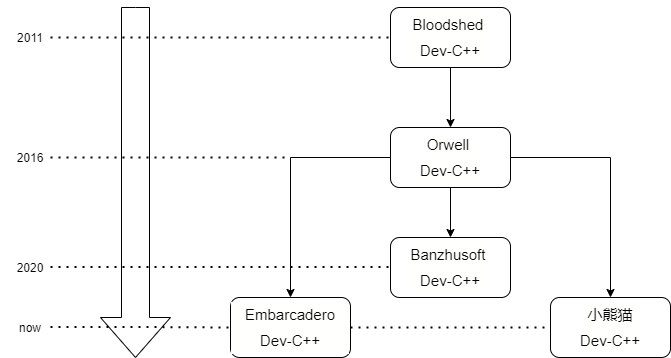
<table>
<thead>
<tr>
<th>Dev-C++版本</th>
<th>开发商（者）</th>
<th>更新情况</th>
<th>特点</th>
</tr>
</thead>
<tbody>
<tr>
<td>Bloodshed Dev-C++</td>
<td>Bloodshed公司</td>
<td>2011年 v4.9.9.2 后停止开发</td>
<td>蓝色经典</td>
</tr>
<tr>
<td>Orwell Dev-C++</td>
<td>独立开发者 Orwelldevcpp</td>
<td>2016年 v5.11后停止更新</td>
<td>TDM-GCC 4.9.2 32/64bit</td>
</tr>
<tr>
<td>Banzhusoft Dev-C++</td>
<td>国内开发者 Banzhusoft （斑竹软件）</td>
<td>最新版本 5.15（2020年9月发布）</td>
<td>现代化的改进、编译出错信息中文显示、代码自动格式化</td>
</tr>
<tr>
<td>小熊猫Dev-C++ (原名Dev C++ 2020)</td>
<td>国内开发者 royqh1979</td>
<td>最新 2021年8月20日 Version 6.7.5</td>
<td>优化改进代码补全提示、界面改善功能增强、自动链接、自带GCC集成EGE绘图库和海龟作图库及其项目模板</td>
</tr>
<tr>
<td>Embarcadero Dev-C++</td>
<td>Embarcadero公司</td>
<td>最新 2021年1月31日 v6.3</td>
<td>增新功能，添加了新主题，增加了多种字体，主图标更改为红色</td>
</tr>
</tbody>
</table>
<h3 id="版本演进">版本演进</h3>
<figure data-type="image" tabindex="1"><img src="https://z3.ax1x.com/2021/10/11/5Z2lWT.png" alt="Dev-C++版本演进" title="截至2021年10月11日" loading="lazy"></figure>
<h3 id="各版本工作界面">各版本工作界面</h3>
<p>Banzhusoft Dev-C++<br>
<img src="https://bkimg.cdn.bcebos.com/pic/8694a4c27d1ed21b0ef48ee18824cac451da81cb91d7?x-bce-process=image/watermark,image_d2F0ZXIvYmFpa2UxNTA=,g_7,xp_5,yp_5/format,f_auto" alt="Banzhusoft Dev-C++ 5.15 工作界面" title="Banzhusoft Dev-C++" loading="lazy"><br>
小熊猫Dev-C++<br>
<img src="https://bkimg.cdn.bcebos.com/pic/d788d43f8794a4c27d1e84ee6cbe0cd5ad6edcc49396?x-bce-process=image/watermark,image_d2F0ZXIvYmFpa2UxNTA=,g_7,xp_5,yp_5/format,f_auto" alt="小熊猫Dev-C++ 2020 工作界面" title="小熊猫Dev-C++" loading="lazy"><br>
Embarcadero Dev-C++<br>
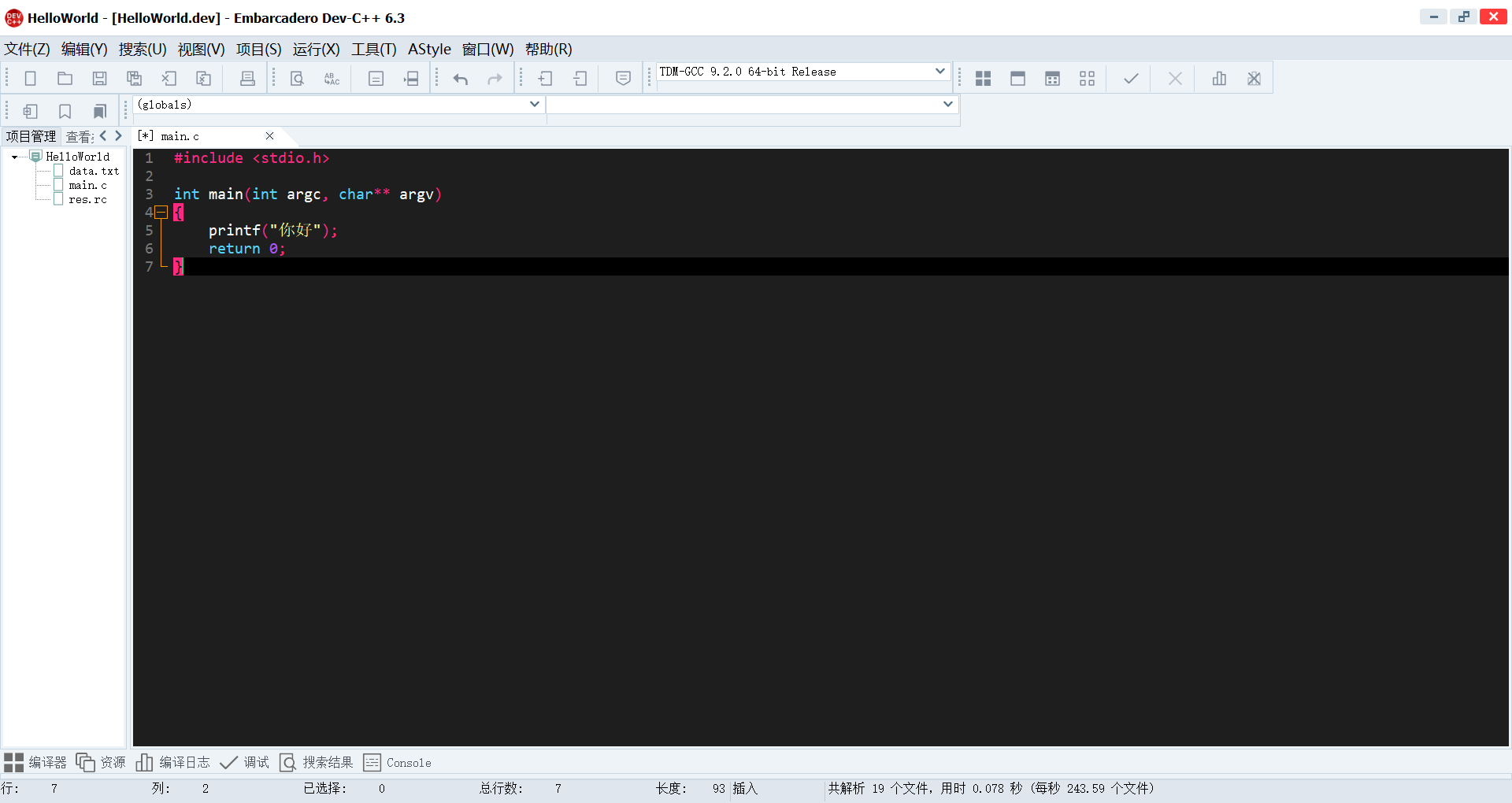
<img src="https://z3.ax1x.com/2021/10/10/5ET3f1.png" alt="Embarcadero Dev-C++ v6.3 工作界面" title="Embarcadero Dev-C++" loading="lazy"></p>
<h3 id="笔者推荐的版本">笔者推荐的版本</h3>
<p>小熊猫Dev-C++和Embarcadero Dev-C++都是不错的选择，截至目前两者都在持续更新。<br>
小熊猫Dev-C++较原版Dev-C++界面变动小，还添加了图形库方便初学者，对国人更为友好。<br>
Embarcadero Dev-C++界面更为现代、美观，由Embarcadero公司维护，较为可靠（大概）。<br>
笔者选择Embarcadero Dev-C++作为本文研究对象。</p>
<h2 id="dev-c常见问题及技巧">Dev-C++常见问题及技巧</h2>
<h3 id="新手问题">新手问题</h3>
<h4 id="新建工程">新建工程</h4>
<blockquote>
<p>请在Dev-C++中将<code>工程</code>区别于<code>源代码</code></p>
</blockquote>
<p>文件&gt;新建&gt;项目，选择项目模板、编程语言、填写项目名称，完成。</p>
<h4 id="dev-c工程结构">Dev-C++工程结构</h4>
<p>一个普通工程目录下有如下文件</p>
<pre><code>    HelloWorld.dev 项目文件，双击打开这个Dev-C++项目
    HelloWorld.exe 编译生成的可执行文件
    HelloWorld.layout 项目的其他配置信息（如编辑器的外观设置）
    main.c 代码文件
    main.o 编译中间产物
    Makefile.win Makefile文件（Windows平台）
</code></pre>
<h4 id="解决输出中文乱码">解决输出中文乱码</h4>
<p>如果你直接在Dev-C++中打印<code>你好</code>，你会得到<code>浣犲ソ</code>。<br>
要解决这个问题，工具&gt;编译器选项&gt;编译器，勾选<code>编译时加入如下命令</code>，在下方文本框中输入<code>-fexec-charset=gbk</code>，问题解决。</p>
<h3 id="进阶技巧">进阶技巧</h3>
<h4 id="解决编辑器中文无法显示">解决编辑器中文无法显示</h4>
<blockquote>
<p>截至2021年10月14日官方还是没有修复，相关的issue积攒了五六个(╬▔皿▔)凸</p>
</blockquote>
<p>你可能遇到过在编辑器中输入中文取消选中后文字隐形的情况，不要着急，急也没用。<br>
工具&gt;编辑器选项&gt;显示&gt;编辑器字体，取消勾选底部的<code>ID 27071 translation missing</code>，中文正常显示。</p>
<h4 id="为程序添加图标">为程序添加图标</h4>
<blockquote>
<p>图标文件仅支持<code>ico</code>格式，可以使用在线转换网站转换图片文件到*.ico文件。</p>
</blockquote>
<p>项目&gt;项目属性&gt;普通，图标&gt;库——可以使用自带的图标，图标&gt;浏览——可以使用自定义的图标。</p>
<h4 id="为程序添加资源">为程序添加资源</h4>
<h4 id="选32位还是64位">选32位还是64位</h4>
<p>64位的程序仅支持在64位的平台上执行，而32位的程序在32位和64位的平台上都能执行。<br>
不过32位的程序在64位平台有最大使用内存等限制。<br>
请根据你的目标平台选择。</p>
<h4 id="隐藏控制台黑窗口">隐藏控制台黑窗口</h4>
<p>项目&gt;项目属性&gt;编译器&gt;定制&gt;连接器&gt;不产生控制台窗口，选择Yes。</p>
<h4 id="添加第三方库">添加第三方库</h4>
<p>项目&gt;项目属性</p>
<h5 id="添加库文件">添加库文件</h5>
<p>进入<code>文件/目录</code><br>
库目录——添加第三方库的.a和.dll文件目录。<br>
包含文件目录——添加第三方库头文件目录。</p>
<h5 id="链接库">链接库</h5>
<p>进入<code>参数</code><br>
在<code>链接</code>下面的文本框中添加链接参数，例如：-luuid，多个库使用空格或换行分开。</p>
<h5 id="常见绘图库">常见绘图库</h5>
<h4 id="什么是win32程序">什么是win32程序</h4>
<h2 id="参考资料">参考资料</h2>
<p>[1]<a href="https://baike.baidu.com/item/dev/8534609">dev（计算机语言C/C++开发工具）_百度百科</a><br>
[2]<a href="https://baike.baidu.com/item/Dev-C%2B%2B/4461658">Dev-C++_百度百科</a></p>
]]></content>
    </entry>
    <entry>
        <title type="html"><![CDATA[《Moe Era》 - 时代潮流中不值一提的我]]></title>
        <id>https://lzw-723.github.io/post/moe-era-ren-ying-dang-gan-jin-de-chong-fen-de-sheng-huo/</id>
        <link href="https://lzw-723.github.io/post/moe-era-ren-ying-dang-gan-jin-de-chong-fen-de-sheng-huo/">
        </link>
        <updated>2021-09-08T11:43:47.000Z</updated>
        <summary type="html"><![CDATA[<p>这是一个深刻的、奇妙的故事。过了一个小时，就像只过了几秒。</p>
]]></summary>
        <content type="html"><![CDATA[<p>这是一个深刻的、奇妙的故事。过了一个小时，就像只过了几秒。</p>
<!-- more -->
<h2 id="初识">初识</h2>
<p>Steam商店界面简介：</p>
<blockquote>
<p>进入可爱的东西的时代吧！这个世界什么都有，只缺少一个能够解救四个美女的英雄。这个英雄会是你吗？</p>
</blockquote>
<p>Steam游戏评测摘选：</p>
<blockquote>
<p>在游戏的结局，就像是作者站在街道上对过往的行人们微笑致意；“你可千万不要再这样过下去了”。而结尾希望我们无论是去做什么，要对自己选择有意义的生活，无论平淡与否，为之改变自我，认识自我，找到自我的价值，即使平淡也是幸福的。</p>
</blockquote>
<blockquote>
<p>如果你是冲着“免费‘”色情内容”“恋爱模拟”这几个标签来的，仅此而已，那就请先改变你的想法，否则你会得不到你想要的，这游戏给不了你，不如去色情分区自己买。</p>
</blockquote>
<blockquote>
<p>噢上帝，你绝对不会相信我竟然在一款免费的游戏里看见了动态背景CG，以及天马行空的立绘展现方式，甚至还穿插有通过选择组合出一款属于你自己的蛋糕的创意内容。欧美游戏制作者们不拘一格的想象力让我看见了不同于日产galgame的更多可行性，这仅是我游玩半个小时的直观感受！</p>
</blockquote>
<blockquote>
<p>如果我是作者，做一款表现自己的游戏大概如此，把自己想法分成好几个家伙，中间塞点福利，免费让大家认识自己。</p>
</blockquote>
<h2 id="体验">体验</h2>
<table>
<thead>
<tr>
<th>项目</th>
<th>分数</th>
</tr>
</thead>
<tbody>
<tr>
<td>画面</td>
<td>⭐⭐⭐⭐</td>
</tr>
<tr>
<td>剧情</td>
<td>⭐⭐⭐⭐⭐</td>
</tr>
<tr>
<td>翻译</td>
<td>⭐⭐⭐</td>
</tr>
<tr>
<td>音乐</td>
<td>⭐⭐⭐⭐</td>
</tr>
</tbody>
</table>
<p>虽然我更喜欢日系动漫画风，但本作画面在细细品味一番后，别有风味，说不上特别优秀，为游戏加分没得说。动态背景、CG配合情节确实惊艳。<br>
<img src="https://steamuserimages-a.akamaihd.net/ugc/1751309932144390345/08D74ADE48F714A8C96641A2B6FCD1C7F692B32B/?imw=5000&amp;imh=5000&amp;ima=fit&amp;impolicy=Letterbox&amp;imcolor=%23000000&amp;letterbox=false" alt="人物情感在画面中的表达" loading="lazy"><br>
本作的音乐风格偏空灵，不免让我联想起DDLC。<s>事实证明不过是虚惊一场</s><br>
有几段音乐很有俄罗斯风格。<br>
弹钢琴的剧情让我记住了<strong>舒曼</strong>和他的<em>梦幻曲</em>。</p>
<iframe frameborder="no" border="0" marginwidth="0" marginheight="0" width=max height=86 src="//music.163.com/outchain/player?type=2&id=1434268573&auto=1&height=66"></iframe>
<p>原谅我对音乐的无知（笑）。<br>
<img src="https://steamuserimages-a.akamaihd.net/ugc/781877465267243716/D9D9ABE9036A8640DCE6B79DEA9888FA3B9D6CB5/?imw=5000&amp;imh=5000&amp;ima=fit&amp;impolicy=Letterbox&amp;imcolor=%23000000&amp;letterbox=false" alt="无可挑剔的古典（？）音乐情节" loading="lazy"><br>
游戏用四天来映射一生，其余的人生用几张桌面的变迁代替。<br>
从游戏中看，除了一生中最精彩的一小段时间，其余的时光不值一提。<br>
但现实中的人生，像我一样，也许从不会出彩，能一眼望到死。<br>
<img src="https://steamuserimages-a.akamaihd.net/ugc/784129913445095821/3BC2201551B68E2FBCC726B74CCA7B5A25C62427/?imw=1920&amp;&amp;ima=fit&amp;impolicy=Letterbox&amp;imcolor=%23000000&amp;letterbox=false" alt="人生如梦" loading="lazy"><br>
游戏支持<code>中、英、俄、日</code>四种语言，有的文本翻译的十分接地气，有的又像是机翻一样。<br>
这是唯一扣分的地方。<s>不知道是不是刻意而为之</s><br>
<img src="https://i.niupic.com/images/2021/09/09/9uWl.png" alt="我操.jpg" loading="lazy"><br>
<img src="https://i.niupic.com/images/2021/09/09/9uWf.png" alt="疑似机翻" loading="lazy"></p>
<h2 id="资料">资料</h2>
<ol>
<li><a href="https://zh.wikipedia.org/wiki/%E7%BD%97%E4%BC%AF%E7%89%B9%C2%B7%E8%88%92%E6%9B%BC">舒曼 - 维基百科</a></li>
<li><a href="https://music.163.com/song?id=1434268573">舒曼: 《童年情景》梦幻曲 - Piano lullaby classic (클래식 기타의 향기) - 网易云音乐</a></li>
</ol>
]]></content>
    </entry>
    <entry>
        <title type="html"><![CDATA[C语言教程 - for循环]]></title>
        <id>https://lzw-723.github.io/post/c-yu-yan-jiao-cheng-for-xun-huan/</id>
        <link href="https://lzw-723.github.io/post/c-yu-yan-jiao-cheng-for-xun-huan/">
        </link>
        <updated>2021-09-04T22:51:28.000Z</updated>
        <summary type="html"><![CDATA[<p>C语言中的for循环非常简单。</p>
]]></summary>
        <content type="html"><![CDATA[<p>C语言中的for循环非常简单。</p>
<!-- more -->
<h2 id="tutorial">Tutorial</h2>
<p>C语言中的for循环非常简单。你能用它创建一个循环—一块运行多次的代码块。<br>
for循环需要一个用来迭代的变量，通常命名为<code>i</code>。</p>
<p>for循环能够做这些：</p>
<ul>
<li>用一个初始值初始化迭代器变量</li>
<li>检查迭代变量是否达到最终值</li>
<li>增加迭代变量的值</li>
</ul>
<p>如果想运行代码块10次，可以这样写：</p>
<pre><code>int i;
for (i = 0; i &lt; 10; i++) {
    printf(&quot;%d\n&quot;, i);
}
</code></pre>
<p>这段代码会打印从0到9的数字。</p>
<p>for循环能够用来获取数组的每一个值。要计算一个数组所有值的和，可以这样使用<code>i</code>：</p>
<pre><code>int array[10] = { 1, 2, 3, 4, 5, 6, 7, 8, 9, 10 };
int sum = 0;
int i;

for (i = 0; i &lt; 10; i++) {
    sum += array[i];
}

/* 求a[0]到a[9]的和 */
printf(&quot;Sum of the array is %d\n&quot;, sum);
</code></pre>
<h2 id="exercise">Exercise</h2>
<p>计算数组array的阶乘（从array[0]乘到array[9]）。</p>
<h2 id="tutorial-code">Tutorial Code</h2>
<pre><code>#include &lt;stdio.h&gt;

int main() {
  int array[] = { 1, 2, 3, 4, 5, 6, 7, 8, 9, 10 };
  int factorial = 1;
  int i;

  /* 在这里使用for循环计算阶乘*/

  printf(&quot;10! is %d.\n&quot;, factorial);
}
</code></pre>
<h2 id="expected-output">Expected Output</h2>
<pre><code>10! is 3628800.
</code></pre>
<h2 id="solution">Solution</h2>
<pre><code>#include &lt;stdio.h&gt;

int main() {
  int array[] = { 1, 2, 3, 4, 5, 6, 7, 8, 9, 10 };
  int factorial = 1;

  int i;

  for(i=0;i&lt;10;i++){
    factorial *= array[i];
  }

  printf(&quot;10! is %d.\n&quot;, factorial);
}
</code></pre>
]]></content>
    </entry>
</feed>